Your email platform says 'delivered'. All that means is a server somewhere accepted it. Here are the five places an email goes missing between your CRM and a buyer's attention, with numbers from 10.4 million sends, and what to check at each one.This blog post is based on a webinar I delivered in October 2026. Here is the recording, the slide deck and an email deliverability checklist that you can download.
And now, the blog post itself.
I'm on the record as saying that email is probably the most important, and almost certainly the last fully owned, marketing channel available to us. It behoves us to write great emails that people really want to read. That's not the topic of this post. This one is about the less glamorous half of the job: getting the right emails in front of the right people without them being blocked, filtered, spammed, unsent or unsubscribed.
The promise is simple. By the end you'll know the five places where email goes missing, gets returned to sender or blocked, and how to check each one.
There is no magic wand
Deliverability is one of those things where clients come to us with anecdotes. 'We had a complaint that an email was going into someone's spam folder.' 'We sent some marketing emails and this person didn't get them.' That's usually where the alarm bells start ringing, and they hope I've got some silver bullet, some voodoo I can do that will magically and instantly solve the problem.
I'd love that. I dream of a client that comes along without the technical stuff set up properly, because I can fix that in an afternoon and look like a hero. In the last couple of years we haven't found one.
So let's break the problem down. You might send a hundred thousand emails (we have clients who send millions) and get a report saying 99.1% were 'delivered'. Jolly good. But delivered isn't the same as accepted into somebody's inbox, not spam-filtered, and available for them to read.
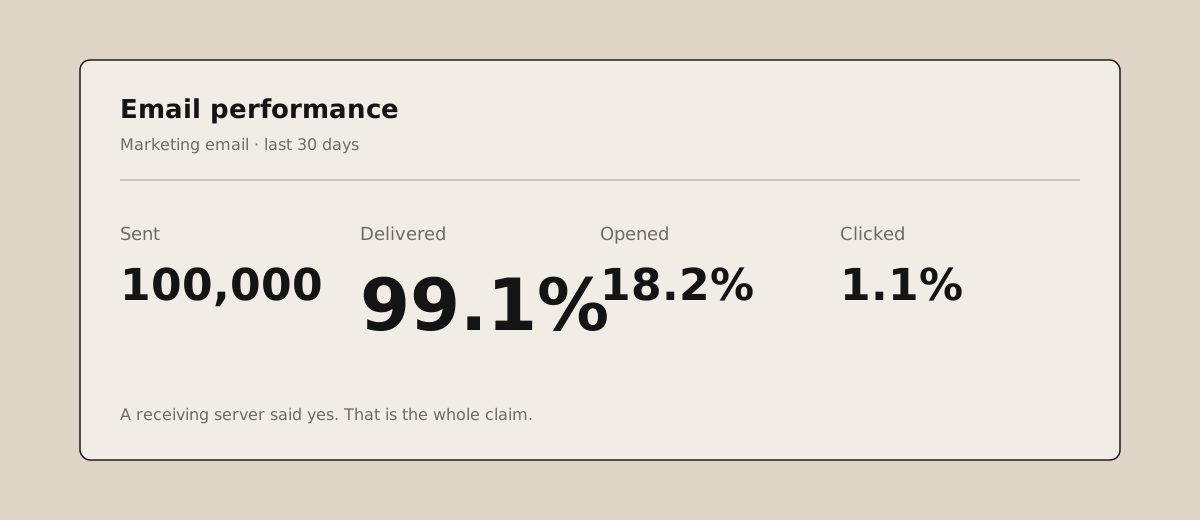
All 'delivered' means is that the email server you sent it to accepted the message. It didn't block it at the gateway. It's inside Microsoft 365, or Google, or somebody's private mail server. It does not mean it reached the inbox.
That's important point number one.
A word about where these numbers come from
Articulate has been on a journey over the last year to improve our own deliverability, so some of what follows are lessons I've learned the hard way. The rest comes from a couple of very large email projects and from Morse, our audit tool for websites, email programmes and HubSpot portals. It's mostly automated, with a human layer of analysis and recommendations on top.
In aggregate we looked at 10.4 million email sends across many thousands of individual emails. Everything here is anonymised; none of it is identifiable to a client.
A few things stood out. Hard bounce rates and spam complaint rates were modest. Bounces were about what you'd expect from list rot: people changing jobs, retiring, companies going bust. Spam complaints were very, very low, which suggests people have basically given up reporting unwanted email. If you're lucky they unsubscribe instead, and that's a better signal that you're sending things people don't want to read.
But while open rates have been volatile (for reasons I'll come to), click rates across those 10 million sends have been declining significantly quarter on quarter. On the surface that doesn't look like a deliverability problem. It looks like a content problem. And that's the point: you may not know you've got a deliverability problem. It's rarely 'our numbers are this, we've got to do something'. It's anecdote, and a slow slide.
The lesson from all of it: deliverability is not a switch. You don't get some geek to come along and do a thing in your HubSpot portal and deliverability is solved. It's dozens of small things. It's a series of reviews, optimisations, improvements, tests and validations. It's a habit, not an event.
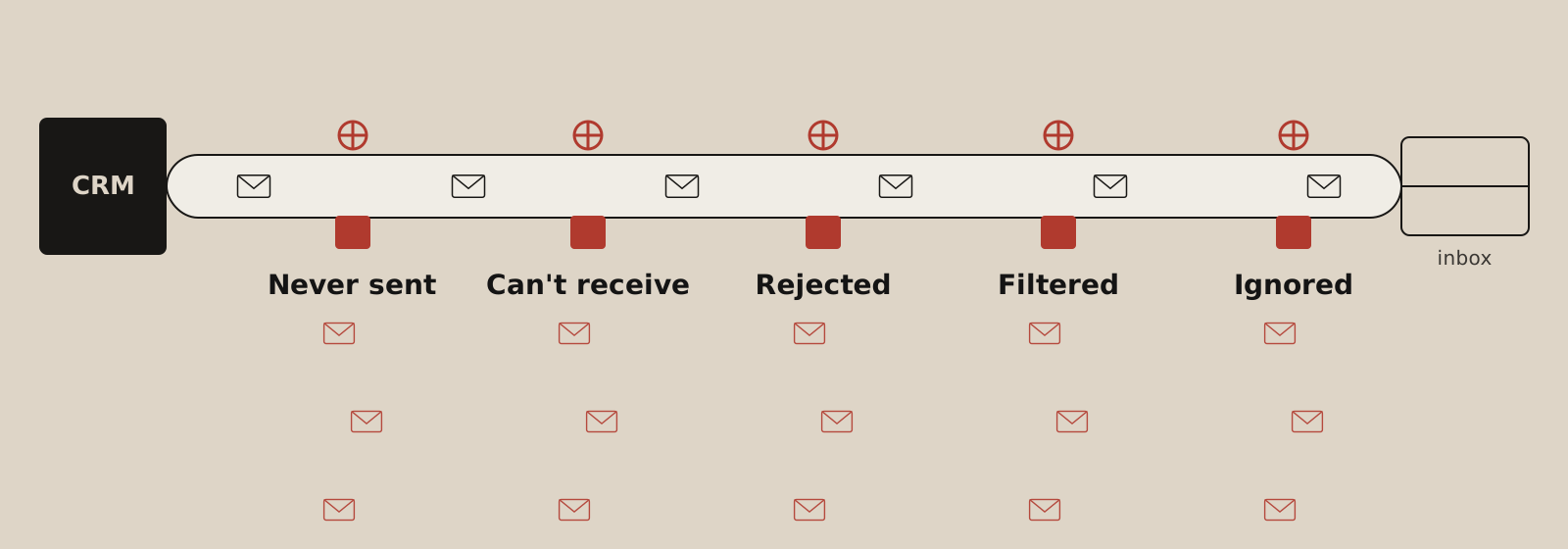
The five places email goes missing
1. Never sent
This is the surprising one. Many emails that you could send are never sent at all. Across the portals we analysed, 24% of marketable contacts had never been sent a marketing email. These are contacts with a valid email address, who haven't unsubscribed, who haven't hard-bounced as far as we know, and who are marketing contacts in HubSpot terms, so you're paying to be able to email them. A quarter of them had never had one.
Apart from the fact that HubSpot is making money from the mustard you're leaving on the side of the plate, what's the point of 24% of your contacts if you don't email them?
I'm sitting in a glass house throwing stones here. HubSpot switched us over to the marketing contacts billing model earlier this year (they didn't tell us, they just did it) and a substantial proportion of our own marketing contacts had never received an email. If you're paying for seats you don't use, it's worth reading how to optimise your HubSpot pricing before your next renewal.
2. Can't receive
The second leak is contacts who can't get your email at all: hard-bounced addresses, unsubscribed addresses, invalid addresses, and the role accounts (info@, sales@) that come back flagged when you run a list through a checker like NeverBounce.
Hard bounces are really common. Depending on the portal, hard-bounced contacts can be as high as 20% of the database. That's shocking, because again you're paying HubSpot to store those contacts, you're including them in sends, and there's nobody on the other end. What it betokens is that there's no automated mechanism for retiring people from the mailable pool when they bounce. That's a configuration issue, and it's fixable.
We also had one portal with more than 10,000 duplicate contacts. HubSpot won't email the same address twice, but if the same person is in there under two or three different addresses, they'll get it two or three times.
There's a subtler version of this too. You send to an address, you don't get a hard bounce, but you get a 'this person has left the company' auto-reply. Once. And then you keep emailing a mailbox that's alive, receiving, and empty. If we send a thousand emails, I guarantee five to ten of them come back like that. We're looking at how to capture and process those messages automatically, possibly with some AI, because at the moment almost nobody does.
The fix for all of this is boring but mechanical. Do something about bounced emails. Deduplicate. Validate every list before it goes in.
3. Rejected
Leak three is the emails that bounce or trigger an unsubscribe on arrival. For the better-managed portals, the hard bounce rate on a given send was below 1%. In some portals, individual sends hit 26%. One send bounced 66 out of 607. Another bounced 70 out of 991.
Typically this is where somebody has bought a list, or imported an event list, or dug some old addresses out of Gmail and loaded them in. It's just old, bad data. And when a third of the people you send to unsubscribe on the spot, that tells you they really weren't expecting to hear from you.
The best email health score of any client we work with (not in the Morse pool, as it happens) sits at eight or nine out of ten in HubSpot, month after month. They have double opt-in. Every subscriber filled in a form asking for the emails. They're based in Germany and they've done everything strictly by the book. Small list, excellent deliverability, and people who really want to hear from them. That's the top of the mountain. It's not always achievable in marketing, but it's the direction to aim in. As I said in an earlier webinar on segmentation, all marketing is targeting; not all marketing is good at it.
4. Filtered
Then you get the placement problem: the gap between the mail server accepting your email and it reaching the end user's inbox. Somewhere in between, it got filed as spam.
This is the leak that clients think we can fix with a magic wand. It's the one that gets reported anecdotally (the CEO sends an email and it doesn't get through) and it's the one nobody can see. Clients expect a technical fix, when actually it's usually the cumulative result of everything upstream: sending lots of email to people who didn't want it, to addresses that bounced, to people who weren't there any more. All of that feeds your sender reputation. Sometimes there is a technical cause too, and I'll come to that.
The scale of it: you could be losing one in eight emails that you think have been delivered. Across millions of emails, the industry data puts spam-filtering at around 12% (Validity, 2026 Email Deliverability Benchmark Report; it's seed-list data from a vendor, so treat the decimal places loosely, but the shape is right).
5. Ignored
And then you've done all that work to get into the inbox, and you get ignored. This is also a deliverability issue, because you can train people to ignore you. If I've spammed you (my word, not yours) with webinar invitations and you've ignored them all, you probably didn't come to the webinar.
Here's the data point. Across many millions of recipients and tens of millions of sends, a little over half, and in some portals as many as two-thirds, of marketable contacts had received ten or more emails since they last opened or clicked one. That is ignoring at an epic scale.
You might feel satisfied that you sent an email to 10,000 people. But if only 4,000 of them have ever engaged, do you feel better sending 10,000 emails that 6,000 people ignore, or sending 4,000 to people who do, occasionally and ideally often, engage with your content? In this model 10,000 is a vanity number. 4,000 is the starting point for a realistic email programme. I'd rather have a thousand engaged, well-segmented contacts than a hundred thousand I know nothing about.
The thing that largely stops this is HubSpot's graymail suppression (the 'don't send to unengaged contacts' checkbox on every send). The vast majority of clients don't use it. When you switch it on and watch your likely recipients drop from 10,000 to 4,000, it's a bit dispiriting, and that's why most people don't. It needs judgement too: it can hold back contacts who've had ten sends but never had a fair chance to engage. But across the portfolio, sends with it switched on had significantly better open rates than sends without.
The leaky pipeline
Never sent, can't receive, rejected, filtered, ignored. Those are your five barriers. My gut feel across our portfolio, and this is an estimate rather than a calculation, is that something like one in ten, maybe two in ten, of those 10 million emails actually landed in somebody's inbox and got looked at. That's a leaky, leaky pipeline, and it's before you start thinking about opens and clicks.
If you send 5,000 a day, this stopped being optional
If you're sending more than 5,000 emails a day (several clients in this population were) you have to be doing the technical stuff. One-click unsubscribe. Few complaints. And the alphabetti spaghetti of acronyms below sorted out. Otherwise Google, Microsoft and Yahoo will simply not deliver your emails. Google and Yahoo moved first in 2024; Microsoft was the last mover, in May 2025. This is now a hurdle you have to clear.
One-click unsubscribe you get from HubSpot and most other platforms. Complaints are fundamentally about what you send and who you send it to. The acronyms are the bit clients think we're going to fix for them, and as I said, I wish I could. In the last few years we haven't found a client that didn't have most of it set up. But if you haven't, you're going to be very heavily spam-filtered.
The acronym soup
All of these live in the DNS settings for your domain. We use Cloudflare; you go there, look up articulatemarketing.com, and ask for the SPF, the DKIM, the DMARC and, if you've got it, the BIMI. It's probably locked up by the magicians in your IT department. Ask them nicely.
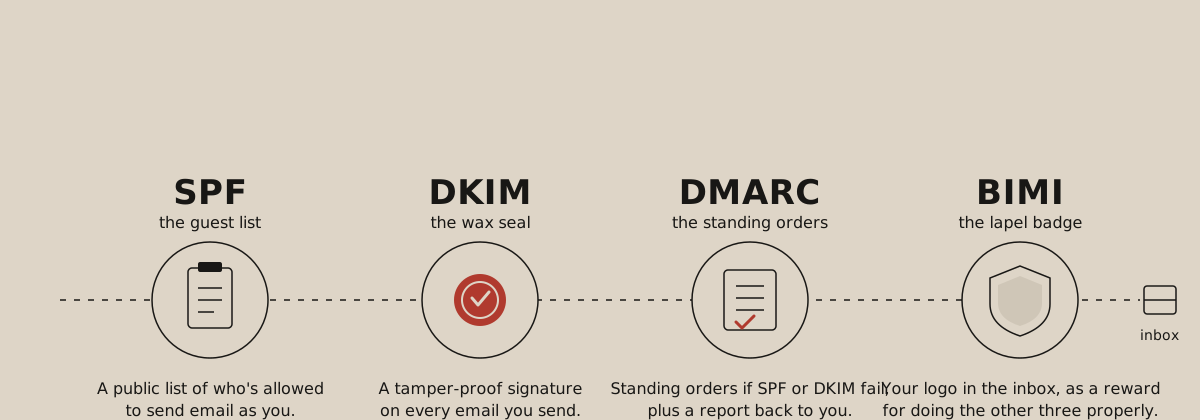
It doesn't much matter what any of them stand for. Here's what they do.
SPF is the guest list. A list of email senders that are authorised to send on your behalf. You send five million emails from HubSpot, so they arrive from HubSpot's servers. The receiving mail system says: hang on, this is from HubSpot, and I don't know whether HubSpot is allowed to send as articulatemarketing.com. It checks the SPF record. If HubSpot (or Mailchimp, or whatever you use) is on the list: tick.
DKIM is the wax seal. A cryptographic key that wraps around the email, its contents and its sender. It lets the receiving server check that this specific email is legitimately from that sender and hasn't been tampered with on its journey across the internet. If DKIM fails, most mail systems will just reject the message.
When you set up your sending domain in HubSpot it gives you the records to add, and it will warn you if they're wrong. Occasionally people fat-finger the configuration, but it's very rare that we find SPF or DKIM missing altogether.
DMARC is the standing orders. Where we do find problems is here. DMARC tells the receiving server what to do with an email that fails SPF or DKIM: an impostor, someone pretending to send from you, something interfered with in transit. And by default, you can publish a DMARC policy that says do nothing (p=none). It passes muster with Google, Yahoo and Microsoft, because a policy exists. But it doesn't say anything.
A well-configured DMARC policy is a journey, and it's one we've been on at Articulate: from do nothing, to quarantine suspicious email, and now all the way to 100% reject. I don't recommend flipping your policy straight to reject for your domain and all its subdomains, because there are almost certainly more systems sending email on your behalf than you think. When we audited ours using EasyDMARC, I'd forgotten about ScoreApp, which sends ten or twenty emails a month when people fill in a quiz. It took me a while to work out what the failures were. Once I had, I brought it into our SPF and DKIM and the failures stopped.
So you need a tool that monitors DMARC enforcement and shows you which legitimate senders are failing. It typically takes two or three months of ratcheting up the policy and checking, checking, checking. But you want to end at 100% reject for anything you don't control. DMARC also tells receiving servers where to send reports on what they rejected, which is how you get visibility of all this in the first place. A DMARC record with no reporting address is a policy you can never check.
BIMI is the lapel badge. A certificate and a logo that says: if this email passes all the above, display this logo next to it in the inbox. It's exciting and a bit sexy, especially if you're trying to prove trustworthiness. It has little to do with deliverability directly, though it almost certainly improves brand recognition, trust and open rates, which feeds reputation in some nebulous way. You can't have it until everything else is tied up, and unlike the rest it costs real money: DMARC monitoring is tens of pounds a month, a BIMI certificate is around £1,500. As soon as I find the time and rummage down the back of the sofa for the money, I'm applying.
What we found in the wild
Across the internet, huge numbers of senders have no DMARC policy at all, and another big chunk sit at p=none: monitoring, no enforcement (EasyDMARC's 2026 adoption report puts it at roughly half with no record and under a quarter enforcing). So if you enforce DMARC properly you're automatically on the side of the angels.
In our own portfolio, most clients sit where Articulate does: SPF, DKIM and DMARC set up reasonably well. But we found one portal with none of it on one sending domain while the others were fine. Another had SPF, DMARC at none, and DKIM not properly configured on one domain. The pattern is multiple sending domains: the root domain is usually fine because IT set it up once, and the subdomains marketing added later are where it breaks.
Nobody had BIMI. Including us.
Do you need BIMI? No. Do you need a dedicated IP? Probably not, unless you're sending more than 100,000 emails a month consistently, at which point building and protecting your own sender reputation is worth more than pooling it with everyone else on your email provider's shared IPs. If you want to fix deliverability, the five leaks are where to look first. These two are bolt-on go-faster extras.
The tools on my desk
These are the ones I use, among others.
- Morse, our audit tool, which runs across the whole portal and finds the five leaks.
- Claude and Claude Code. Increasingly you can ask Claude to go and look at a DNS record, probe it, test it, and report back. It's a bit of a worrywart; it tends to find problems and report them before you've interrogated it intelligently ('yes, yes, you said that, but what about this?'). But I've found it more and more helpful for diagnosis. It's a good example of what to delegate to AI and what to keep: the probing, not the judgement.
- MXToolbox. Free, online, looks up your mail records. You can also send it an email and it reads back what it saw.
- EasyDMARC. Our DMARC monitoring tool. There are others (dmarcian, Valimail). Pick one; I wouldn't call them interchangeable but I haven't used them all.
- HubSpot email health. An incredibly valuable screen that nobody looks at. If you're bouncing around at three or four out of ten month after month, that's a sign you need to do something, and there's good direction in there about what.
- Google Postmaster Tools. The most overlooked tool of all. Free. Tells you what Gmail thinks your reputation is. Why would you not go to the source? Sign up and check it regularly.
Three things to do
At a high level:
- Check your DNS. Make sure all of it is properly configured. Start making a plan to ratchet up your DMARC policy. Audit every system that sends email on your behalf and make sure each one is in your SPF and DKIM estate.
- Watch your reputation. Use the tools above. Reputation, like bankruptcy, happens very slowly and then very suddenly. If you're monitoring it, Hemingway-style, you can spot the slope before you see the cliff. Recovering a reputation that's been trashed by over-sending is a lot more work than protecting one you've already got.
- Test every list. Every time you bring contacts in from any source: validate, authenticate, deduplicate, and do everything you can to make sure they really want, or at least expect, to hear from you.
A brief word about open rates
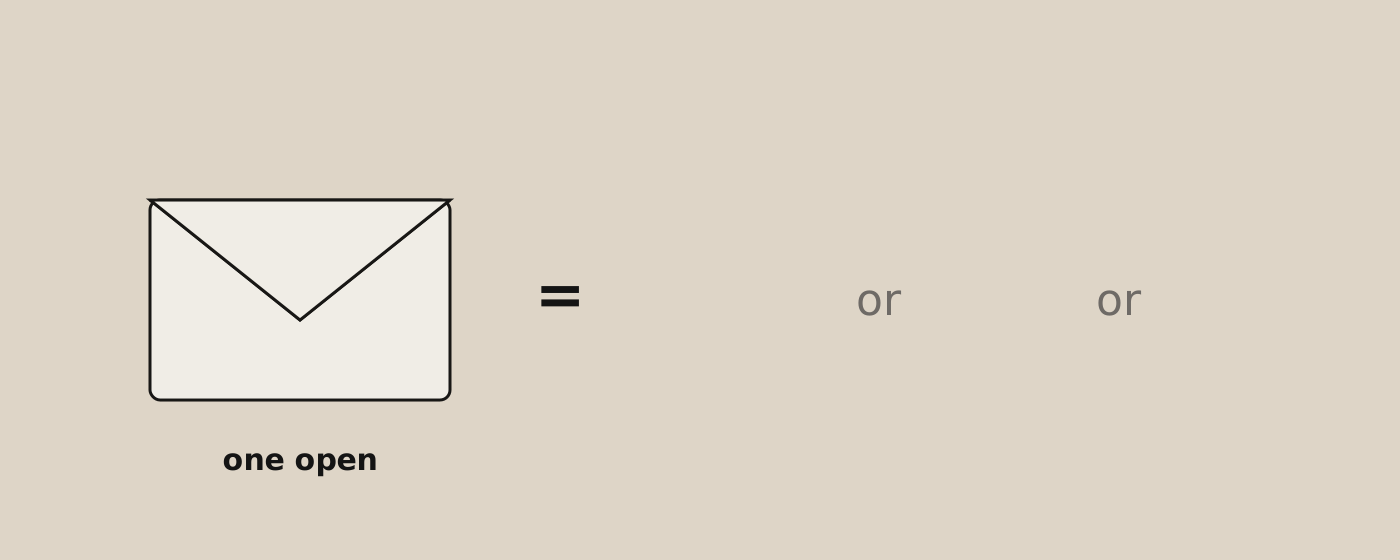
I don't think open rate is any longer a good proxy for deliverability. It's directionally and comparatively interesting, but increasingly Apple Mail and corporate security scanners open your emails and click every link in them, and those look like opens and clicks to your email platform. In our portals, between 15% and 71% of opens came from privacy proxies with no identifiable device.
There's a compliance angle too. If you're sending to Italy or France and you haven't got consent to put a tracking pixel in the email, you're likely to get into trouble with their regulators. I think that's the direction of travel: open tracking will get harder and harder to deploy compliantly. Measure clicks, replies and meetings instead.
What to do first
Pick the thing you don't understand, or that scares you the most. A black hole, a lack of evidence, a lack of insight, is the biggest sign that something needs attention. When we get called in, most clients are paying close attention to one or two of the five leaks and none to the others. Which ones varies from client to client.
And if I had to pick one thing for everyone: switch on HubSpot's graymail suppression. You'll send fewer emails and that might hurt a little. But you'll get more honest feedback about who's actually reading, and we see significantly better open rates on sends that have it switched on across the portfolio. Partly that's arithmetic: fewer sends, the same engaged readers. But it's also improving your sender reputation, and that improves deliverability for everything else you send.
Delivery isn't a setting. It's an attitude.
There isn't a button I can click in your HubSpot portal that will magically improve your deliverability. There are a few things that, if you aren't doing them, will help: DNS configuration if it's wrong, and graymail suppression if it's unused, are the most immediate. Both need some thought and care to deploy properly.
But mostly it's like going to the gym, eating your vegetables and meditating every day. You have to put the work in. It's not a setting; it's an attitude, a habit. The good news is that habits compound. Fix one thing a week and the deliverability, engagement and reach of your email campaigns will improve week on week on week.
As Churchill said, the mind cannot absorb more than the seat can endure, so I'll stop there.
Want your own numbers? I'll happily run Morse over your HubSpot portal and show you your five leaks. Book a meeting or email matthew@articulatemarketing.com. And if the problem turns out to be the emails themselves rather than the plumbing, start with six steps to crafting marketing emails your audience actually wants to read.
This post is based on Matthew's webinar, Diagnosing email deliverability, recorded 14 October 2026. Morse figures are aggregated and anonymised across five email audits (10.4 million sends over twelve months) and seven HubSpot infrastructure audits. External figures: Validity, 2026 Email Deliverability Benchmark Report; EasyDMARC, 2026 DMARC Adoption and Enforcement Report; Google, Yahoo and Microsoft bulk-sender requirements, 2024–2025.